The main difference between outsourced and co-managed IT support is that outsourced IT transfers day-to-day IT operations to a provider, while co-managed IT shares responsibility between your internal team and the provider.
Choose fully outsourced IT support if you have no internal IT team, or want a provider to run IT end to end. Choose co-managed IT support if you have an internal team that is stretched thin and needs help with day-to-day operations, after-hours cover or specialist support, while you keep control of decisions.
For most Australian mid-market organisations, the real question is not which model is better. It is where your internal team's time is best spent, and what you would rather hand to a provider. IT outsourcing in Australia covers everything from fully outsourced IT departments to co-managed support. This guide explains how each model works, where they differ, and how to decide.
What is fully outsourced IT support (IT outsourcing)?
Fully outsourced IT support means a managed service provider takes responsibility for day-to-day IT operations. That typically covers the service desk, device and user management, patching, monitoring, vendor liaison and reporting, usually under a monthly agreement with defined service levels.
It suits organisations without an internal IT team, or those that want IT run as a service so leadership can focus on the business. The trade-off is less direct control over day-to-day decisions, so the quality of the provider's reporting and account management matters.
What is co-managed IT support?
Co-managed IT support is a shared model. Your internal IT team stays in place and keeps ownership of priorities and decisions, while a provider takes on defined parts of the workload, such as the service desk, after-hours cover, patching, monitoring or specialist support.
It suits mid-market organisations where the internal team is capable but stretched. Instead of replacing the team, the provider delivers agreed services around it using its own people and tools, under defined service levels. Your team sets priorities without supervising individual engineers. Clear role boundaries are the key to making it work.
Outsourced vs co-managed IT support at a glance
The main differences come down to who owns decisions, who does the work, and how your internal team's time is used.
|
Factor
|
Fully outsourced
|
Co-managed |
|
Internal IT team |
None, or minimal |
Kept, with the provider alongside |
|
Who owns IT decisions |
Shared, with the provider leading day-to-day |
Your internal team leads |
|
Day-to-day workload |
Provider handles it |
Split by agreed responsibilities |
|
After-hours and 24/7 cover |
Usually included |
Often the first thing added |
|
Specialist skills (cloud, security, Microsoft 365) |
Provided by the provider |
Provided where your team has gaps |
|
Control and visibility |
Through reporting and reviews |
Direct, through your team |
|
Scalability |
Scales with the contract |
Scales up or down around the team |
|
Vendor management |
Provider |
Shared |
|
Reporting |
Provider |
Shared governance |
|
Best suited to |
Organisations with no IT team |
Mid-market teams that need help with workload, cover or skills |
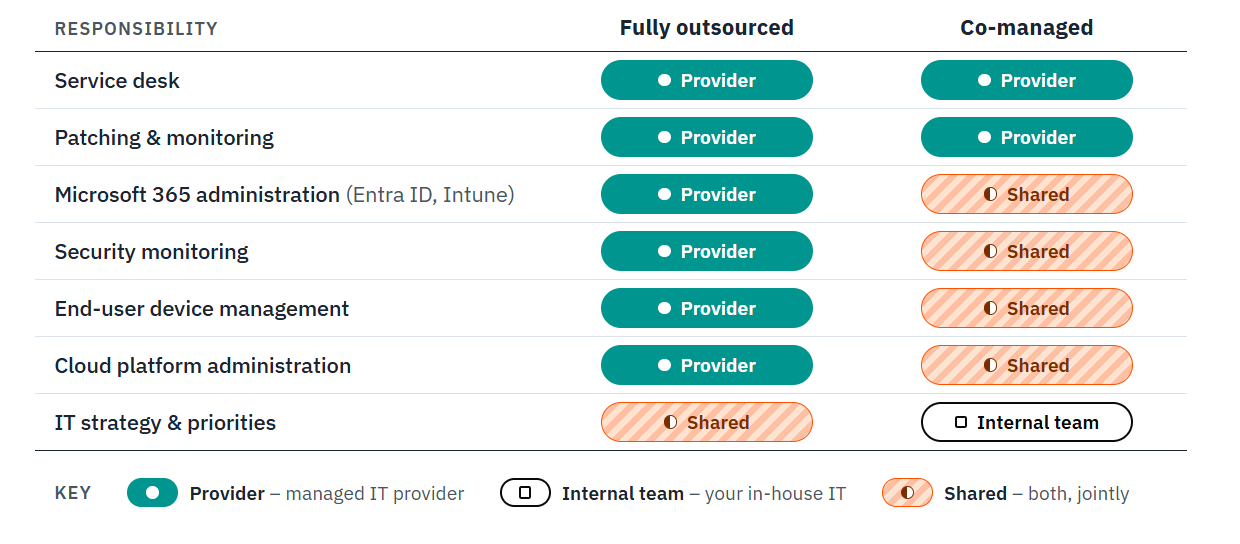
The diagram below shows how operational responsibilities are commonly shared between a managed service provider and an internal IT team. The exact split varies by organisation and provider.
Typical responsibility split in outsourced and
co-managed IT support
How to choose between outsourced and co-managed IT support
Work through these questions with your leadership team. The pattern in your answers usually points to one model.
-
1. Do you have an internal IT team? If not, fully outsourced is the practical starting point. If you do, co-managed lets you build on it.
-
2. Where is your team's capacity going? If most hours disappear into tickets, password resets, and patching, a provider can take that routine work so the team can focus on projects and strategy.
-
3. Do you need cover outside business hours? Small teams rarely sustain after-hours support, and unplanned outages are costly, as we explain in What does downtime cost my business? A provider can fill that gap without you hiring more staff.
-
4. Are there skills gaps? Specialist areas such as cloud, security and Microsoft 365 administration are hard to staff in-house. Australia's tech workforce shrank for the first time on record, according to ACS Digital Pulse 2026, and the country will need 259,000 more tech workers over the next decade. Co-managed fills specific gaps, while outsourced covers them all.
-
5. How much control do you want to keep? If your IT leaders want to own architecture, vendors, and priorities, co-managed keeps that with them.
-
6. What do your compliance obligations require? Regulated sectors such as financial services, legal, and healthcare need clear accountability, so check who is responsible for what under each model. Our guide to compliance for SMBs in financial services is a useful starting point.
-
7. How will your needs change? If you expect growth or a major transformation, choose a provider and a contract that can adjust the scope without a full renegotiation.
Which model fits your situation?
Use this as a starting point, then test it against the questions above.
|
Your situation
|
Usually the better fit
|
|---|---|
|
No internal IT team |
Fully outsourced |
|
One or two IT staff overwhelmed by support requests |
Co-managed |
|
Need after-hours or 24/7 cover |
Either, with co-managed if your team covers business hours |
|
Need specialist Microsoft 365, cloud, or security skills |
Either, with co-managed if your team covers the rest |
|
Want IT run end to end as a service |
Fully outsourced |
|
Want to keep control of strategy and vendors |
Co-managed |
If you're unsure, a sensible approach is to start co-managed and widen the provider's scope as trust builds.
Who looks after Microsoft 365 in each model?
For most mid-market organisations, Microsoft 365 is the centre of daily work, so it is worth spelling out who owns what. Ask any provider to put this in writing.
-
-
Identity and access: who manages Entra ID, conditional access, and multi-factor authentication.
-
Devices: who runs Intune, deployment and patching.
-
Security: who monitors Defender alerts and responds to incidents.
-
Licensing and cost: who reviews licences and advises on the right plan.
-
Copilot and AI readiness: who checks permissions and data governance before rollout, and who supports adoption afterwards.
-
In a fully outsourced model, the provider usually takes all of this. In a co-managed model, your team may keep identity and licensing decisions while the provider handles patching, monitoring, and the service desk. Either can work, as long as responsibilities are agreed and nothing is left unowned. To see how these areas fit together, read You've invested in Microsoft 365. Now make it secure and Enterprise-grade security for SMBs: Microsoft 365 Business Premium add-ons, or explore our Microsoft 365 services. If a Copilot rollout is planned, our Microsoft 365 Copilot readiness services cover the governance and security groundwork.
Questions to ask IT support providers that offer both models
Some Australian providers offer both models, which lets you change the balance as your needs change. When comparing them, ask:
-
-
Can we move from co-managed to fully outsourced, or back, without a new contract?
-
Which services can be taken individually, such as service desk only or after-hours cover only?
-
How are service levels defined, and how are response and resolution times reported?
-
Is support delivered onshore in Australia, and during which hours?
-
How do you work alongside an internal team, including handovers, escalation, and shared documentation?
-
What security capability sits alongside IT support, and how is it integrated?
-
Which compliance frameworks, such as Essential Eight or ISO 27001, do you support?
-
Can you share references from organisations of similar size or in our industry?
-
Ask every shortlisted provider the same questions and request the answers in writing. Comparing responsibilities, service levels, reporting and security capabilities side by side makes it easier to choose the support model and provider that best fit your organisation.
Frequently asked questions
Choosing the right model
Start with where your team's time goes, then choose the model that frees it for the work only your team can do. To talk through which model suits your organisation, contact The Missing Link or explore our managed IT services. For a wider guide to selecting a provider, read 5 key factors to consider when choosing a managed service provider.