Even a short period of IT downtime can quickly become expensive once you account for lost revenue, idle staff time, recovery costs, and customer trust. Research puts the median cost of a high-impact outage at around USD $2 million an hour, but industry benchmarks only tell part of the story. The figure that matters most is what downtime would cost your own business.
This article covers what current research says, how to calculate your own downtime cost, and how to reduce the risk with a tested recovery plan.
What do industry benchmarks tell us?
There isn't a single answer to what IT downtime costs because every outage is different. The financial impact depends on factors such as your revenue, the systems affected, how many people are unable to work, and how quickly you can recover.
Industry research highlights the potential impact of major outages, but no benchmark can tell you what downtime will cost your business. Most studies also report costs in US dollars (USD).
Recent research highlights the scale of the problem:
-
-
Global: New Relic's 2025 Observability Forecast found that high-impact outages carry a median cost of about USD $2 million per hour, or roughly USD $33,333 per minute.
-
Australia and New Zealand: New Relic's regional findings show that for nearly a third of organisations, high-impact outages cost between USD $1 million and $3 million per hour.
-
The same New Relic research found that around one in four organisations across Australia and New Zealand experience a high-impact outage at least once a week, yet 10% don't measure the financial impact at all.
That's why calculating your own downtime costs is far more valuable than relying on industry averages.
How to calculate the cost of downtime in four steps
To calculate the cost of IT downtime, add lost revenue, idle staff time, and recovery costs for each hour of the outage, then track hidden costs such as lost customers separately. Steps 1 to 3 give you a dollar cost per hour using numbers from your finance and IT teams, and step 4 covers the costs that are harder to measure.
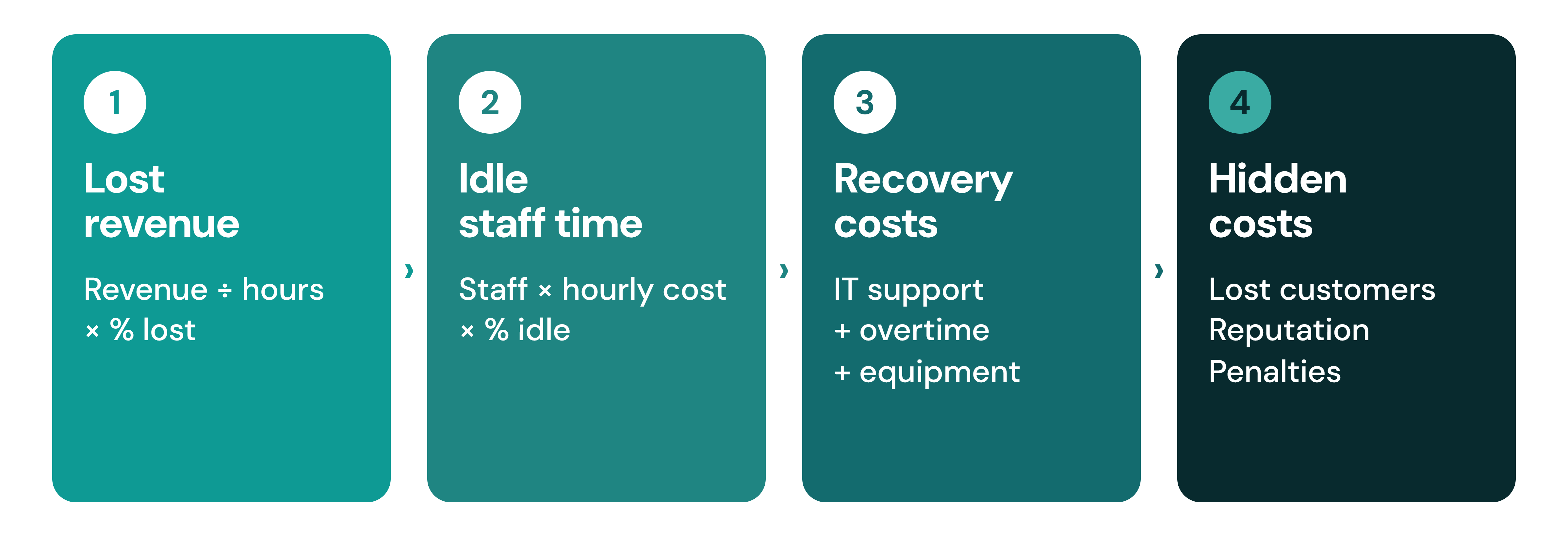
Step 1: Lost revenue. Divide annual revenue by trading hours, then multiply by the share of revenue you would actually lose. Some sales are delayed, not lost.
Step 2: Idle staff time. Multiply the number of staff who can't work by their hourly cost (salary plus on-costs such as super and leave), then by the share of productivity lost.
Step 3: Recovery costs. Add emergency IT support, incident response, overtime, and replacement equipment.
Step 4: Hidden costs. Track lost customers, missed orders, reputational damage, regulatory penalties, and delayed projects separately. While these costs are difficult to measure, they often have the greatest long-term impact. Lost customers and damaged reputation can affect revenue long after systems have been restored.
Cost per hour of downtime = lost revenue per hour + idle staff cost per hour + recovery costs per hour. Multiply by the length of the outage for the total.
Worked example: calculating the cost of a four-hour outage
This is an illustrative example in Australian dollars, not a benchmark.
In this example, an outage costs about $28,000 an hour. Here is how it adds up: a business with $50 million in annual revenue trades for 2,500 hours a year, so it earns $20,000 an hour. During an outage, 100 staff at $60 an hour can't work, which adds $6,000 an hour. Emergency support and overtime add $2,000 an hour. That makes $28,000 for every hour of downtime, or about $467 a minute.
|
Outage length |
Estimated cost |
| 1 hour | $28,000 |
| 4 hours | $112,000 |
| 8 hours (one business day) | $224,000 |
These figures exclude the hidden costs in step 4, so the real cost is higher.

What are RTO and RPO?
RTO (Recovery Time Objective) and RPO (Recovery Point Objective) are the two measures that define how well you can recover from an outage:
-
-
Recovery Time Objective (RTO): how quickly you need to be back online, which sets how long your business can afford to be offline.
-
Recovery Point Objective (RPO): how much data you can afford to lose, which sets the point in time you restore to and depends on how often you back up.
-
Shorter targets mean better resilience but need more planning and investment, so set them for each system and not once for the whole business. Our guide to RTO and RPO explains how.
What causes IT outages?
Most outages involve people and process as well as technology. Uptime Institute's 2025 Annual Outage Analysis found that nearly 40% of organisations suffered a major outage caused by human error in the past three years, and 85% of those incidents came from staff not following procedures or from flaws in the procedures themselves (Uptime Institute, 2025). Cyberattacks, including ransomware, add further risk.
You can't remove every risk, but you can plan for it. For Australian organisations, regular backups are one of the mitigation strategies in the ASD Essential Eight, and a tested recovery plan is what turns those backups into a fast recovery.
Reducing downtime isn't just about preventing outages. It's also about recovering quickly when they happen. That's where Disaster Recovery as a Service (DRaaS) becomes valuable.
How does disaster recovery as a service (DRaaS) reduce downtime?
Disaster Recovery as a Service (DRaaS) helps you recover your whole IT environment quickly, not just your data. At The Missing Link, our disaster recovery service:
-
-
Replicates your physical servers and virtual machines to Microsoft Azure, so they can be switched on during an outage
-
Targets recovery in under two hours
-
Needs no investment in a secondary data centre
-
Includes annual testing, reporting and regular health monitoring
-
For backup and recovery options beyond disaster recovery, see SmartPROTECT and our backup services.

How can you reduce IT downtime? Five practical ways
Disaster Recovery as a Service (DRaaS) helps you recover your entire IT environment quickly, not just your data. As part of The Missing Link's Disaster Recovery solution, you can:
-
-
Recover your physical servers and virtual machines in Microsoft Azure Cloud Services, so your business can continue operating during an outage.
-
Get back online in under two hours, helping minimise business disruption.
-
Avoid investing in a secondary data centre with a cloud-based disaster recovery solution.
-
Receive annual testing, reporting, and proactive health monitoring to help ensure your recovery plan is ready when you need it.
-
A strong recovery strategy starts with more than disaster recovery alone. Our SmartPROTECT platform provides secure backup and recovery, while our Backup Services help protect your critical business data. Combined with proactive Managed IT Services, these services help reduce downtime and improve business resilience.
FAQs
How can you plan for downtime before it happens?
Every organisation's downtime risk is different. Whether you're reviewing your backup strategy, planning a cloud migration, or improving your disaster recovery capability, understanding the true cost of downtime is the first step towards building a more resilient business.
The right combination of Backup Services, Disaster Recovery, Managed IT Services, and Cloud Services can help reduce business disruption, improve recovery times, and give your team confidence when unexpected outages occur.
If you'd like to understand what an outage could realistically cost your business—or how quickly you could recover—talk to our team today.
If you liked this article, you may also like:
Five reasons your business might need Disaster Recovery as a Service
Disaster Recovery RTO and RPO — two vital ingredients for the lasting health of your business