Enterprise-grade security has traditionally come with an enterprise price tag. For years, many of Microsoft's most advanced identity, threat detection, and compliance capabilities sat behind Microsoft 365 E5 licensing, built for organisations with large budgets and dedicated security teams. But cyber threats don't scale the same way: ransomware, phishing, identity compromise, and regulatory pressure affect businesses of every size, and smaller organisations often face the same risks with far fewer resources to manage them.
That's the gap Microsoft is now trying to close. Its new Security and Compliance add-ons for Microsoft 365 Business Premium, which already combines Microsoft 365 apps, Teams, Exchange Online, device management, and baseline security, bring many of the Defender and Purview capabilities previously reserved for E5 to organisations with up to 300 users. Rather than requiring organisations to move to Microsoft 365 E5, Microsoft is making many of those protections available within the Business Premium environment they're already using.
More importantly, it reflects Microsoft's recognition that enterprise-grade security is no longer just an enterprise requirement. Security shouldn't scale with company size; only risk does.
What's included in each Microsoft Security add-on?
Microsoft has introduced three new add-ons that sit on top of an existing Business Premium subscription. All three are capped at 300 seats per customer, a clear signal these are purpose-built for SMB and mid-market businesses, not a stepping stone toward enterprise plans.
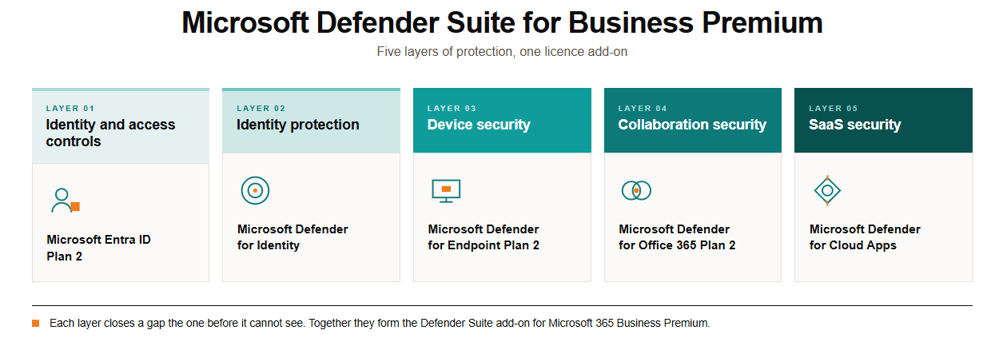
Think of the Microsoft Defender Suite as the advanced security layer for Microsoft 365 Business Premium. It extends your existing licence with stronger identity protection (Entra ID P2), endpoint detection and response, email security, and unified threat detection through Defender XDR, capabilities that were previously reserved almost exclusively for enterprise customers running E5.
The Microsoft Purview Suite is the governance and compliance layer. It covers where sensitive data lives, who can access it, how it moves, and how long it's retained, through Information Protection, DLP, Insider Risk Management, and Premium Audit and eDiscovery. This is the suite that matters most for businesses under regulatory pressure or handling sensitive customer data.
.png?width=957&height=489&name=M365%20Security%20Diagrams-selection%20(2).png)
In simple terms, Defender is about stopping attacks; Purview is about protecting your data and helping you meet compliance obligations.
The combined bundle includes both suites at a lower price than buying them separately. For most SMBs, that makes sense because identity and data protection usually go hand in hand.
Microsoft provides detailed documentation of the features included in both the Defender Suite for Business Premium and Purview Suite for Business Premium.
What do the new Microsoft 365 Business Premium Security add-ons cost?
Add-on |
What it includes |
Price (USD/user/month, annual commitment) |
|
Microsoft Defender Suite for Business Premium |
Entra ID P2, Defender for Endpoint P2, Defender for Office 365 P2, Defender for Identity, Defender for Cloud Apps, Defender for IoT, Defender XDR |
~$10 |
|
Microsoft Purview Suite for Business Premium |
Information Protection, DLP, Insider Risk Management, Premium Audit, Premium eDiscovery, Data Lifecycle Management, Compliance Manager, Message Encryption, Customer Key, Information Barriers |
~$10 |
|
Defender and Purview Suites (combined) |
Everything in both suites above |
~$15 |
These add-ons are purchasable directly through Microsoft or through a Microsoft CSP partner. Businesses already running the E5 Security add-on alongside Business Premium can transition to the new Defender Suite through their next billing cycle.
The combined bundle is positioned by Microsoft as delivering savings of up to 68% compared with buying equivalent enterprise security and compliance tools individually at standard list prices. It's worth noting that this isn't a comparison against the SMB add-on pricing above. Buying the combined bundle for around US$15 instead of purchasing the Defender and Purview suites separately for around US$10 each represents a saving of closer to 25%.
Who should consider these add-ons?
These add-ons are likely to deliver the most value if your business:
-
-
Is approaching cyber insurance requirements and needs to demonstrate stronger controls
-
Handles sensitive customer, patient, or financial data
-
Operates in professional services, healthcare, legal, or financial services
-
Is preparing for ISO 27001 or a similar compliance framework
-
Is adopting or moving toward a Zero Trust security model
-
Has outgrown the baseline protection in standard Business Premium but doesn't need (or can't justify) a full E5 upgrade
-
If your organisation has only basic security requirements and isn't handling sensitive information or meeting specific compliance obligations, Microsoft 365 Business Premium on its own may still provide an appropriate level of protection. The right choice depends on your risk profile rather than your organisation's size.
Why isn't a Microsoft licence enough on its own?
Buying the licence is a five-minute transaction. Getting real value out of it is not.
Defender and Purview are powerful, but they're not switched on and tuned by default. A poorly configured Conditional Access policy can leave privileged accounts exposed. An overly aggressive DLP policy can stop employees doing their jobs. An ineffective Insider Risk configuration can generate thousands of false alerts that get ignored, which defeats the purpose of having it in the first place. These tools need to be configured to match how a business operates, not left as generic templates. And because Microsoft updates these products frequently, "set and forget" quietly turns into "set and drift" if nobody's watching.
Lower pricing doesn't automatically deliver better security outcomes. Microsoft has made these tools easier to buy. Making them work as intended is a different exercise entirely.
For many of the organisations The Missing Link has worked with, the challenge hasn’t been recognising the need for stronger Microsoft 365 security but justifying enterprise licensing costs for a 75- or 150-person business. These new add-ons create a practical middle ground. They also introduce more configuration decisions around identity, compliance, and data protection that need to be planned carefully rather than switched on.

How can The Missing Link help you get more from Microsoft 365?
Turning these capabilities into meaningful protection takes planning, implementation, and ongoing management.
As a Microsoft Solutions Partner and Cloud Solution Provider (CSP), we help organisations get the most from these new add-ons in three key ways:
-
Licensing: We help you determine whether Defender, Purview, or the combined suite best fits your organisation based on your risk profile, industry, compliance obligations, and existing Microsoft environment. We then provision the licences correctly from the outset.
-
Implementation: A licence isn't protection until it's configured. We implement Conditional Access policies, data loss prevention (DLP), identity protection, insider risk controls, and compliance settings that reflect how your business operates, rather than relying on generic templates.
-
Managed security services: The value of these tools doesn't stop once the licences are assigned. Microsoft regularly updates Defender and Purview with new capabilities and controls. Through ongoing monitoring, alert triage, incident response, policy tuning, and continuous optimisation, our managed security services help ensure your investment continues to reduce risk instead of becoming another underused licence.
FAQs
Accessibility isn't the same as security
Microsoft's new Business Premium Security and Compliance add-ons remove one of the biggest barriers preventing SMBs from adopting enterprise-grade security: cost. That's a significant step forward. But lowering the cost of advanced Microsoft security isn't the same as improving security. The organisations that benefit most will be the ones that configure these tools properly and continue to refine them as their environment evolves.
If you're running Microsoft 365 Business Premium and want to know whether the Defender Suite, Purview Suite, or the combined bundle makes sense for your business, get in touch with our team.
Related reading:
- Microsoft 365 Business Premium explained: how to maximise security, compliance, and AI readiness
- 5 reasons to secure and govern your data with Microsoft Purview
- You've invested in Microsoft 365. Now make it secure.