Every business depends on technology. But what happens when the systems you rely on are still running while the security protecting them has fallen behind?
Legacy IT increases cyber security risk because ageing or unsupported systems are harder to patch, monitor, integrate, and protect. As vulnerabilities accumulate and vendor support ends, attackers gain more opportunities to exploit weaknesses.
That risk is growing. According to the 2026 Verizon Data Breach Investigations Report (DBIR), vulnerability exploitation is now the leading initial access vector for breaches, accounting for 31% of breaches analysed. Only 26% of critical known-exploited vulnerabilities in the report's remediation analysis were fully remediated, with the median time to full resolution reaching 43 days.
For Australian businesses, the financial impact is also rising. The Australian Signals Directorate’s Australian Cyber Security Centre (ASD’s ACSC) reported that the average self-reported cost of cybercrime for businesses reached $80,850 per report in FY2024–25, up 50% overall.
So, where does legacy technology fit into this picture? And what can you do about it? Let’s look at how ageing systems can weaken cyber resilience and how to modernise without introducing unnecessary disruption.
Why are legacy systems a cyber security risk?
Legacy systems become a cyber security risk when they can no longer keep pace with current security requirements, patches, integrations, or threats.
Not every older system is automatically insecure. What matters is whether you can still support, monitor, and protect it effectively.
Legacy technology can create problems when systems:
-
-
No longer receive vendor security updates.
-
Depend on applications that can't support newer operating systems.
-
Lack modern identity and multi-factor authentication (MFA) capabilities.
-
Are difficult to integrate with current monitoring and security platforms.
-
Depend on ageing hardware that's increasingly difficult or expensive to maintain.
-
Create gaps in endpoint visibility and consistent configuration management.
-
Attackers don't need every device to be vulnerable. One exposed system can provide the foothold they need to move further into your environment.
The 2026 Verizon DBIR makes this particularly relevant. Vulnerability exploitation has overtaken stolen credentials as the most common initial breach vector, reaching 31% of breaches in its dataset.
The report also found that the median time to fully resolve a critical vulnerability reached 43 days. That's a significant window when attackers can increasingly identify and exploit known weaknesses at speed.
A system doesn't have to stop working to become a business risk. If you can no longer secure, monitor or support it properly, it's already creating exposure.
Figure: When outdated systems start to fail, small issues can quickly cascade into major disruptions.
Is Windows 10 now a legacy security risk?
For organisations still running standard Windows 10 installations without appropriate extended support, Windows 10 is now a clear example of the security challenges created by end-of-support technology.
Microsoft ended standard support for Windows 10 on 14 October 2025. Windows 10 devices continue to function, but standard support no longer provides regular security fixes, software updates, or technical assistance.
Microsoft's Extended Security Updates (ESU) program provides organisations with a temporary way to continue receiving critical and important security updates for eligible devices after the end of support.
But ESU is a transition measure, not a modernisation strategy.
Organisations still using Windows 10 should know:
-
-
Which devices remain on Windows 10.
-
Why they haven't migrated.
-
Whether they have appropriate extended security coverage.
-
What applications or hardware dependencies are preventing migration.
-
What compensating security controls are in place.
-
When each device will be upgraded, replaced, or retired.
-
Our Windows 10 to 11 migration checklist can help you identify dependencies, prioritise devices and build a phased migration plan.
The hidden cost of “set and forget” IT
Keeping an old system can look cheaper than replacing it. The calculation changes when you include the cost of supporting, securing, and working around it.
Legacy technology can contribute to:
-
-
Higher maintenance and support costs.
-
More manual work for IT teams.
-
Compatibility problems with newer applications.
-
Security and compliance gaps.
-
Reduced visibility across endpoints and infrastructure.
-
Greater risk of unplanned downtime.
-
Frustration for people working with slow or unreliable technology.
-
There is also an opportunity cost.
When your IT team spends its time maintaining technology that should have been retired, it has less capacity to strengthen security, automate processes, or deliver projects that support your wider business goals.
This is why technology lifecycle management belongs in your cyber security strategy, not just your IT budget.
How does outdated technology affect cyber resilience?
Outdated technology reduces cyber resilience when it makes attacks harder to prevent, detect, contain or recover from.
Cyber resilience isn't only about stopping an attacker at the perimeter. It's about maintaining critical operations and recovering effectively when something goes wrong.
Consider an unsupported server running a business-critical application. If you can't apply current security updates, integrate it properly with modern monitoring, or recover it quickly after an incident, you've created several layers of risk around one system.
That risk becomes more significant when older systems are deeply connected to your wider environment.
Current Australian cyber security guidance emphasises controls including patching, MFA, restricting administrative privileges, application control, monitoring and recovery. These principles remain relevant even as Australia's cyber security frameworks evolve.
Modernisation allows you to address these controls together rather than treating each weakness in isolation.

Is the Essential Eight being replaced?
The Essential Eight is evolving into a broader series of cyber security guidance called the Essentials series.
In June 2026, ASD announced consultation on the evolution of the Essential Eight. Under the proposed approach, the existing framework will evolve into Essentials for enterprise IT, the first chapter of a broader Essentials series.
The new guidance will be grounded in ASD's Information Security Manual (ISM) and provide prioritised, threat-informed mitigations for contemporary technology environments. Additional Essentials chapters are expected to follow.
This doesn't mean organisations should abandon their existing Essential Eight programs.
ASD says organisations already using the Essential Eight can expect strong alignment with their existing controls and investments.
For businesses modernising legacy IT, the practical takeaway is important: don't modernise simply to meet today's framework. Build security foundations that can adapt as the guidance changes.
That means maintaining visibility over your assets, replacing unsupported technology, managing vulnerabilities, controlling access, monitoring threats, and maintaining tested recovery capabilities.
These security fundamentals will remain valuable regardless of how individual frameworks evolve.
What does a modern, cyber-ready IT environment look like?
A cyber-ready environment gives you visibility over your technology, keeps supported systems patched, controls access and provides a tested path to recovery.
There isn't one technology stack that works for every organisation. A secure environment might be cloud-based, on-premises, or hybrid depending on your workloads, risk profile, and business requirements.
The common factor is control.
Typical characteristics include:
-
-
Supported operating systems and applications.
-
Automated and risk-based Patch Management.
-
MFA and identity-based access controls.
-
Restricted and regularly reviewed administrative privileges.
-
Centralised monitoring and threat detection.
-
Reliable, tested backup and disaster recovery.
-
Consistent endpoint and device management.
-
Network segmentation where appropriate.
-
Regular vulnerability and security assessments.
-
Clear technology lifecycle and replacement plans.
-
These controls give IT and security teams a better view of what's happening across the environment. They also make it easier to identify vulnerabilities, prioritise action and respond when something changes.
At The Missing Link, we approach this through three stages: Assess, Improve and Manage. We map your current environment and identify risks, build a practical improvement roadmap, then provide ongoing management where you need it.
That can include infrastructure, cloud, Managed IT Services, Patch Management, backup and disaster recovery, and Cyber Security.
How can you reduce cyber risk while modernising legacy IT?
You don't need to replace every legacy system at once. In many environments, that isn't realistic.
Instead, identify which systems create the greatest combination of business criticality, security exposure, and support risk.
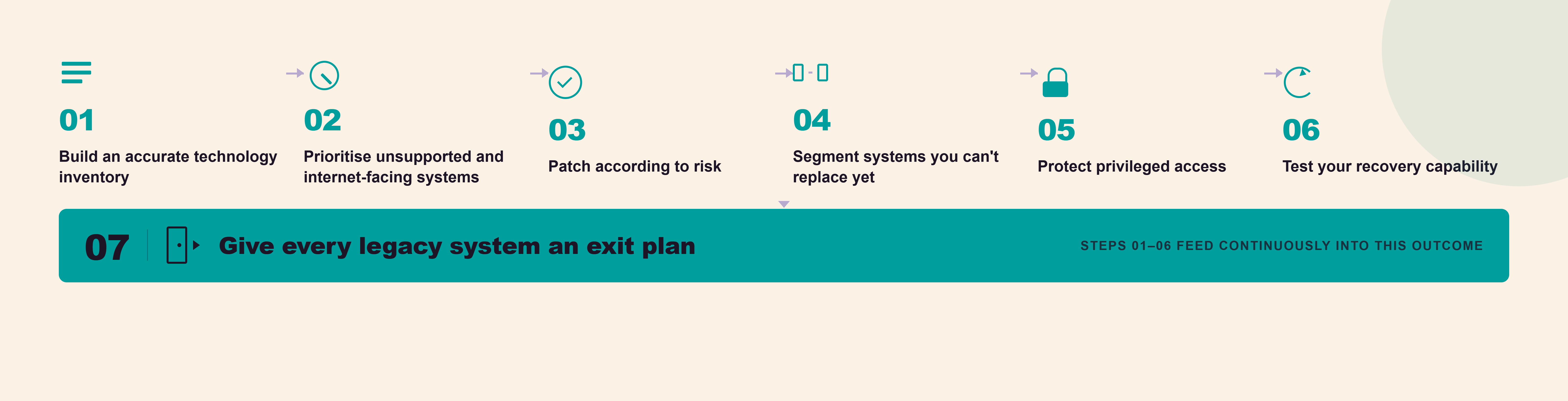
1. Build an accurate technology inventory
You can't protect technology you don't know you have.
Document your operating systems, applications, servers, network devices, and endpoints. Record their support status, business owner, dependencies, and expected replacement date.
This gives you the visibility you need to make risk-based decisions rather than simply replacing technology according to age.
2. Prioritise unsupported and internet-facing systems
An unsupported system exposed to the internet deserves different attention from an isolated legacy application protected by compensating controls.
Consider factors including:
-
-
Whether the system is still supported.
-
Whether it's internet-facing.
-
Whether known vulnerabilities are being actively exploited.
-
What data the system holds.
-
Which business processes depend on it.
-
What would happen if the system became unavailable.
-
What other systems an attacker could reach from it.
-
Use risk to set your priorities rather than age alone.
3. Patch according to risk
Effective patch management prioritises vulnerabilities according to their likelihood and potential business impact, rather than treating every update equally.
This matters because the gap between vulnerability discovery and exploitation is becoming increasingly important.
The 2026 Verizon DBIR found that only 26% of critical vulnerabilities in the CISA Known Exploited Vulnerabilities catalogue were fully remediated by organisations in its analysis during 2025. Median full-resolution time also increased to 43 days.
Australian cyber security guidance is evolving too. ASD's proposed Essentials series will provide prioritised, threat-informed guidance designed for contemporary technology environments.
The underlying principle remains the same: know what technology you have, understand its vulnerabilities, and act according to risk.
Automated Patch Management can help you maintain visibility, identify missing updates, and deploy patches consistently as vulnerabilities emerge.
4. Segment systems you can't replace yet
Some legacy platforms can't disappear overnight because critical applications or operational processes still depend on them.
Where immediate replacement isn't possible, reduce their exposure.
Depending on the environment, this could include:
- Network segmentation.
- Tighter identity and access controls.
- Additional monitoring.
- Restricted administrative privileges.
- Application control.
- Removing unnecessary internet access.
- Stronger controls around connected systems.
These measures can reduce risk, but they shouldn't become an excuse to leave unsupported technology in place indefinitely.
Give the system an exit plan.
5. Protect privileged access
Review who has administrative access and why they need it.
Remove unnecessary privileges, regularly revalidate access and separate privileged activities from normal user accounts.
Combine this with MFA and appropriate identity controls to make unauthorised access more difficult and limit what an attacker can do if an account is compromised.
6. Test your recovery capability
A backup is useful only if you can restore from it when you need to.
Test your backup and disaster recovery processes regularly. Know your recovery time objective (RTO) and recovery point objective (RPO), and make sure they still align with what your business needs.
Legacy systems deserve particular attention here. Restoring an old application isn't always straightforward if the hardware, operating system, dependencies, or specialist knowledge it needs are no longer readily available.
7. Give every legacy system an exit plan
“Temporary” technology has a habit of becoming permanent.
For systems you can't replace today, document:
-
-
The business owner.
-
Why the technology is still required.
-
The risks associated with keeping it.
-
Existing compensating controls.
-
Dependencies preventing migration.
-
Required budget and resources.
-
Target replacement or retirement date.
-
Then review that roadmap regularly.
Why does cyber readiness involve people as well as technology?
Technology modernisation alone won't create cyber resilience.
Your people need to understand why controls change, how new systems work and what role they play in protecting the organisation.
Regular Security Awareness Training can help your team recognise phishing, social engineering and other common threats. It can also build stronger everyday security habits around passwords, access, information sharing and incident reporting.
IT and business leaders have a role too. Modernisation works best when technology decisions connect to business risk rather than being treated as isolated infrastructure projects.
That means asking better questions:
-
-
Which ageing systems could disrupt critical operations?
-
Which systems can no longer meet our security requirements?
-
Where are we accepting risk because replacement has been delayed?
-
How quickly can we identify and remediate an exploited vulnerability?
-
What unsupported technology remains in our environment?
-
Can we recover critical services within the timeframe the business expects?
-
Who owns the decision to retire each legacy platform?
-
Those conversations turn modernisation from a technology refresh into a resilience program.
Take the next step toward resilience
Legacy systems hold businesses back. Modern infrastructure unlocks performance, reduces risk and builds long-term stability.
Book a visibility and risk assessment to uncover vulnerabilities, prioritise improvements and create a clear path to a more secure, future-ready environment.